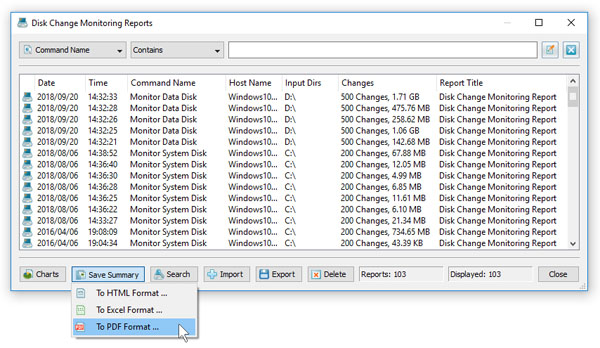
DiskPulse Server provides the ability to save a number of disk change monitoring reports to a consolidated graphical PDF summary report
including various types of pie charts and disk change monitoring statistics. In order to save a summary report, press the 'Reports' dialog
located on the main toolbar, select one or more disk change monitoring reports, press the right mouse button and select the 'Save Summary Report' menu item.
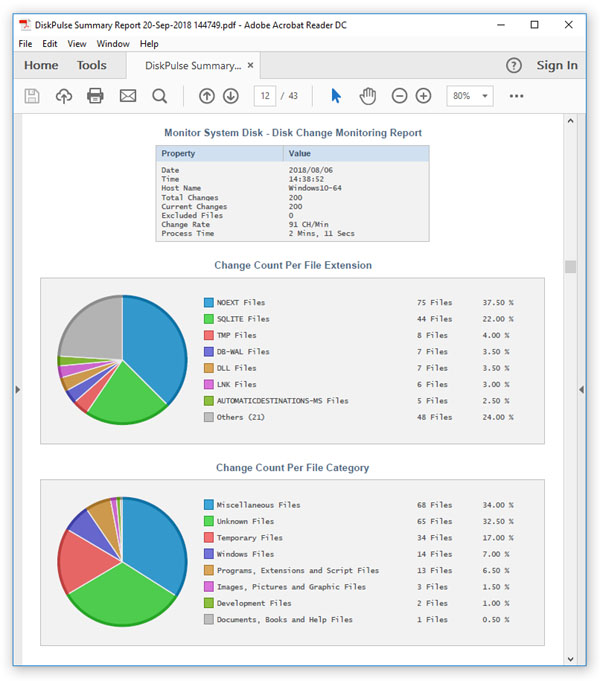
DiskPulse saves summary reports as graphical PDF reports including general information about each disk change monitoring report, a pie chart
showing the number of changes per file extension, a pie chart showing the number of changes per file owner and a pie chart showing the number
of changes per change type.
In addition, DiskPulse Enterprise provides the ability to collect disk change monitoring reports from multiple production servers to a centralized
reports database and then generate summary reports containing information about all monitored servers.